Getting Started › Admins › New feature
Turn on calendar sync for your patrol
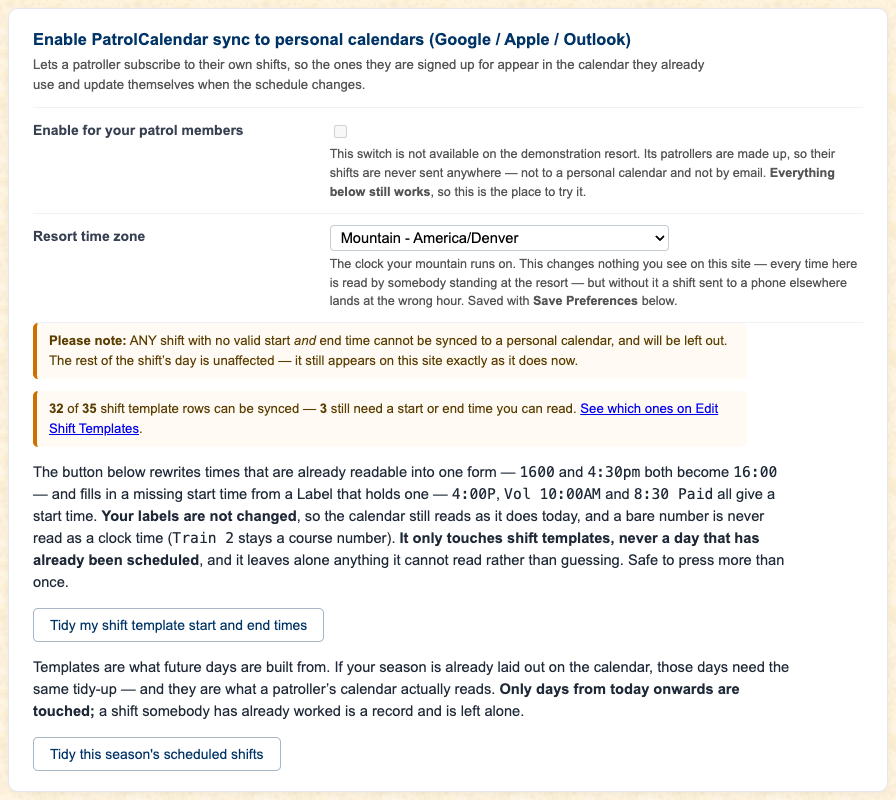
This is the switch that gives your patrollers their personal calendar feed. It is off until you tick Enabled.
Set your time zone first, in the same box. A shift that says 8:00 means nothing in somebody's phone without it, and an hour out is worse than not syncing at all.
A shift needs a readable start and end time to be synced; one without is simply left out of the feed and still shows on the site as before. The box counts how many of your template rows are ready and links to the ones that are not. Two buttons tidy times for you, one for templates and one for this season's days from today on. Both leave anything they cannot read alone and are safe to press more than once.
Read the full admin guide · Back to the index
PatrolCalendar is shift scheduling for ski patrols, maintained by one volunteer patroller and free to use. Questions or problems: Steve@Gledhills.com. Screenshots are from the Sample resort.